Key Information
 Sorry to hear you’re having trouble logging into MyStudyspace. To log into your profile, you’ll need your Student Number and your Password. These were issued to you via email when you first enrolled with us. This email may have ended up in your junk/spam folder. If you have previously logged into the learning platform, then you will have a note of the password you created.
- If you can’t remember the password, you can re-set this using the ‘Lost password’ link. Input your Student Number or registered email address to receive a password re-set email. Don’t forget to check the junk/spam if you don’t receive the email right away.
- If you are trying to log into the Career Hub, your username will be the registered email. Your password will have been issued to you when you enrolled. If you can’t remember your password you can re-set this by using the ‘Reset password’ link. Confirm your email address and click continue to receive the re-set email (remember to check the Spam/Junk if you don’t receive it right away).
- FOR CIPD ONLY
- Before deciding whether you need to request additional time on your course, you should check to see how long you have left to complete your remaining assessments. The end date for your course is shown on the My programs page. This advice can also be found on the My Dashboard page.
- If you need some additional time to complete your remaining assessments, we can arrange this for you. Below is an outline of the extension fees which must be paid in one transaction:
| 1 Month |
£60.00 |
| 2 Month |
£95.00 |
| 3 Month |
£135.00 |
| 4 Month |
£175.00 |
| 5 Month |
£220.00 |
| 6 Month |
£250.00 |
| 7 Month |
£280.00 |
| 8 Month |
£325.00 |
| 9 Month |
£365.00 |
| 10 Month |
£405.00 |
| 11 Month |
£440.00 |
| 12 Month |
£500.00 |
- If you’d like to extend your studies, you can pay the extension fee via bank transfer, or via credit/debit card. If your course is within 30 days of the end date, we will have issued a reminder email to you and this includes links to our automated online payment platform. To make a manual payment for an extension, please contact us for details.
Once an extension fee has been paid this is non-refundable.
- Following the end of the course support period, we will process a withdrawal of your registration with CIPD. This means that If you do not extend within 3 months of your support ending and an extension is granted you may be required to pay an additional fee for us to re-register you with the Awarding Organisation.
- If you need additional time due to a medical condition that has prevented you from studying, we can review your circumstance and potentially provide an extension without fee on medical grounds. To do this, please submit a letter from your doctor. This letter must state that you have been unable to study, due to your medical condition. The letter must confirm the period of time for which you were unable to study. We’ll review the provided advice and get back to you as soon as we can.
- FOR CIPD ONLY
- Before deciding whether you need to request additional time on your course, you should check to see how long you have left to complete your remaining assessments. The end date for your course is shown on the My programs page. This advice can also be found on the My Dashboard page.
- If you need some additional time to complete your remaining assessments, we can arrange this for you.
- If you’d like to extend your studies, you can pay the extension fee via bank transfer, or via credit/debit card. If your course is within 30 days of the end date, we will have issued a reminder email to you and this includes links to our automated online payment platform. To make a manual payment for an extension, please contact us for details.
Once an extension fee has been paid this is non-refundable.
- Following the end of the course support period, we will process a withdrawal of your registration with CIPD. This means that If you do not extend within 3 months of your support ending and an extension is granted you may be required to pay an additional fee for us to re-register you with the Awarding Organisation.
- If you need additional time due to a medical condition that has prevented you from studying, we can review your circumstance and potentially provide an extension without fee on medical grounds. To do this, please submit a letter from your doctor. This letter must state that you have been unable to study, due to your medical condition. The letter must confirm the period of time for which you were unable to study. We’ll review the provided advice and get back to you as soon as we can.
- FOR CIPD ONLY
- Before deciding whether you need to request additional time on your course, you should check to see how long you have left to complete your remaining assessments. The end date for your course is shown on the My programs page. This advice can also be found on the My Dashboard page.
- If you need some additional time to complete your remaining assessments, we can arrange this for you.
- If you’d like to extend your studies, you can pay the extension fee via bank transfer, or via credit/debit card. If your course is within 30 days of the end date, we will have issued a reminder email to you and this includes links to our automated online payment platform. To make a manual payment for an extension, please contact us for details.
Once an extension fee has been paid this is non-refundable.
- Following the end of the course support period, we will process a withdrawal of your registration with CIPD. This means that If you do not extend within 3 months of your support ending and an extension is granted you may be required to pay an additional fee for us to re-register you with the Awarding Organisation.
- If you need additional time due to a medical condition that has prevented you from studying, we can review your circumstance and potentially provide an extension without fee on medical grounds. To do this, please submit a letter from your doctor. This letter must state that you have been unable to study, due to your medical condition. The letter must confirm the period of time for which you were unable to study. We’ll review the provided advice and get back to you as soon as we can.
FOR CIPD ONLY
Assessment and draft assessment submissions are sent to the assessor for marking every Thursday.
The assessments are then processed, with the grade and feedback being uploaded within fifteen working days. e.g. an assessment is submitted on Tuesday the 10th of February. The assessment is then sent to the assessor on Thursday the 12th of February; this begins the fifteen working days for grading and feedback.
Submitting assessments
Your assessment must be submitted as a single file in .doc/.docx format.
Every unit has an assessment guidance video to help you through the process. You can locate these in the
section above the assessment submission section of each unit
To submit an assessment, click on the assessment name next to this icon 
Now click on the 'Add submission' icon.
We have to check all submitted assessments for plagiarism and AI use (this includes tools like Grammarly)
Click the blue icon to agree to proceed.
You will now be presented with the Turnitin user agreement.
Click ‘I agree’ to proceed with the automated checks and assessment submission.
You now need to complete the assignment submission checklist. If your assessment is missing any of these elements you will fail and need to re-submit a second attempt. Check each item on the list.
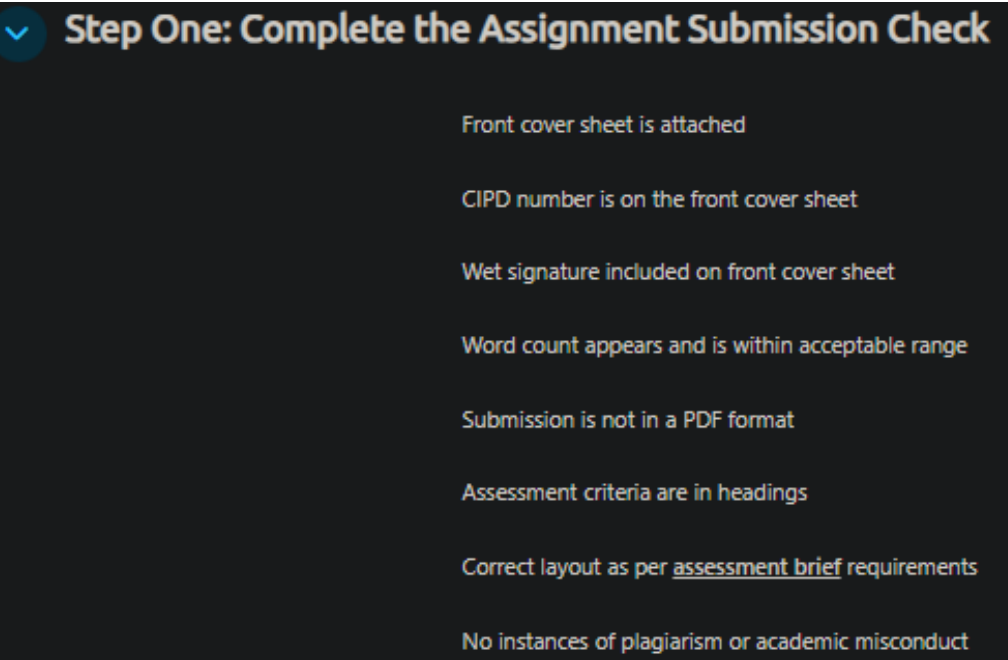
Confirm you wish to proceed. You can now upload your document.
Either drag/drop the file or select its location in your device and upload. Click 'Save Changes' to proceed.
Click 'click here to submit your assignment' to submit the assessment and then 'Continue' to confirm. You can now see the submission status. You will receive a notification to confirm the submission was completed.
Your grade and feedback will be visible along with the grade table.
Windows of Submission
A Window of Submission refers to the period during which questions are released, and you can submit your assessment. It includes specific dates and times for submission, marking, and potential resubmissions. This timeframe also allows us to second mark and quality assess your work before it is sent to the CIPD for review.
You should complete any resubmission attempts within this window. If you are unable to resubmit within the timeframes, you will need to sit a new set of questions in the next window.
The CIPD expect all activities to be completed within the window for all centres. Below is an overview of what will happen in a window of submission:
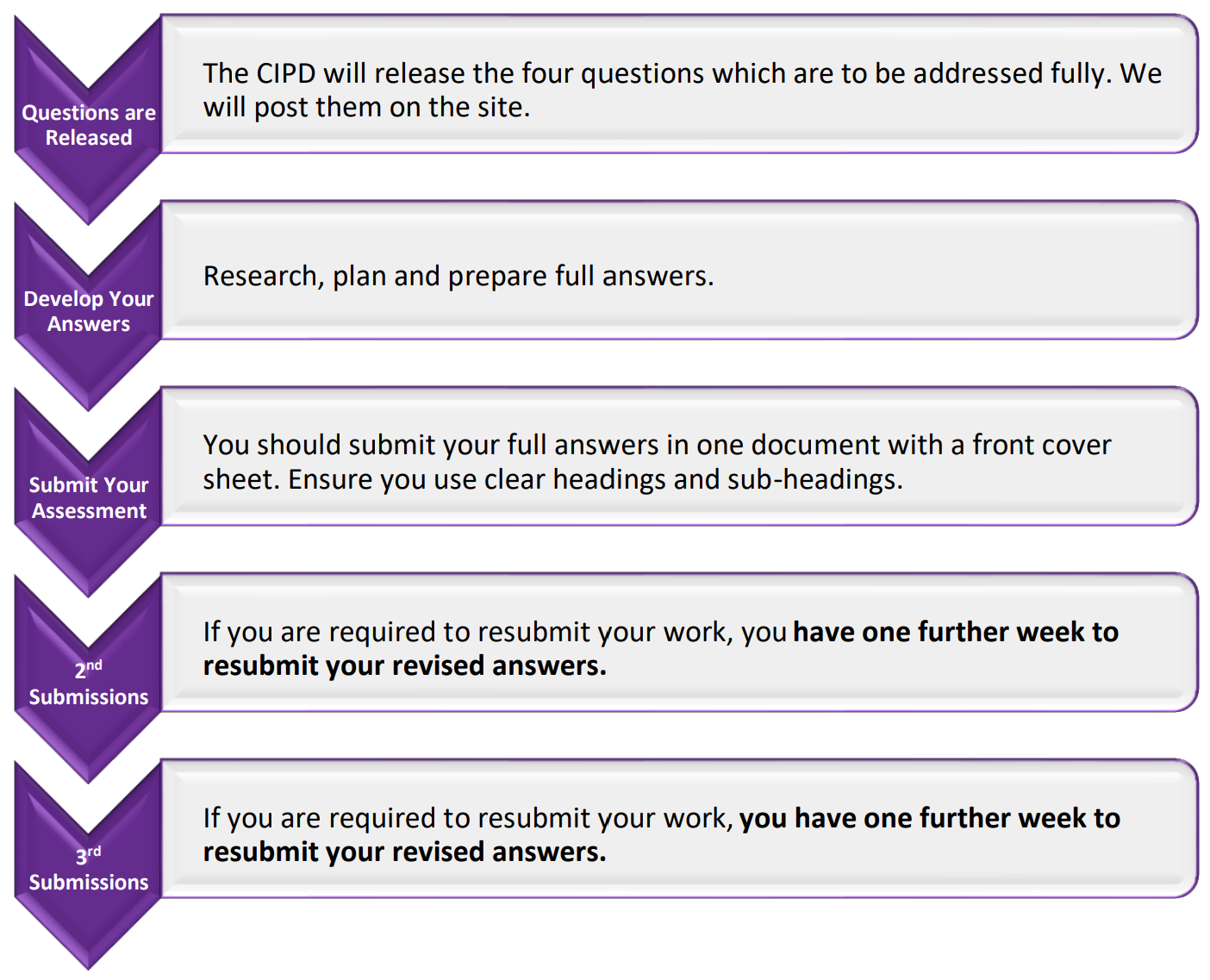
Please note that if you have a 3rd attempt for 7CO01/02/03, the CIPD have stated that results will be sent by
centres in the next available window.
This is because centres won’t have time to complete the required quality procedures before the results are sent for moderation.
The Unit Guide will provide a set of 16 questions in this unit guide, from which 4 will be selected to be answered fully and sent to our markers.
Once the window opens you will have 2 weeks to develop your answers and submit them.
You should write approximately 1,000 words per question and submit them together in a single document.
The total word count for the assignment will be 4,000 words, plus or minus 10%.
You must not use over 4400 words, or you will lose a submission attempt. Please check your word count carefully.
The bibliography or list of references is not included in the total word count.
Business Research Project
For help with this unit (7CO04) please refer to the guidance videos or contact your tutor for assistance
FOR CIPD ONLY
Here at The ICS Learn Group, we’re committed to making sure all assessments are fair, transparent, and carried out in line with awarding‑body requirements.
If you believe a fail (refer) grade has been awarded unfairly, you have the right to request an appeal in line with the ICS Learn Group Appeals Policy and CIPD requirements.
To understand whether you’re eligible to appeal and what happens next, please read the Appeals Policy on MyStudySpace. You’ll find it here:
CIPD Resource Library → Announcements - All Students → CIPD Appeals Procedure
Please make sure you’ve read the policy in full before submitting your appeal.
Important All appeals must be submitted through this official Appeals Form. We’re unable to process appeals sent via email, chat, or support tickets.
CIPD have set moderation windows throughout the year, during which they will review and process assessments submitted after the close of the previous window.
Following the end of the moderation window the grades are confirmed and certificates for completing students
are issued.
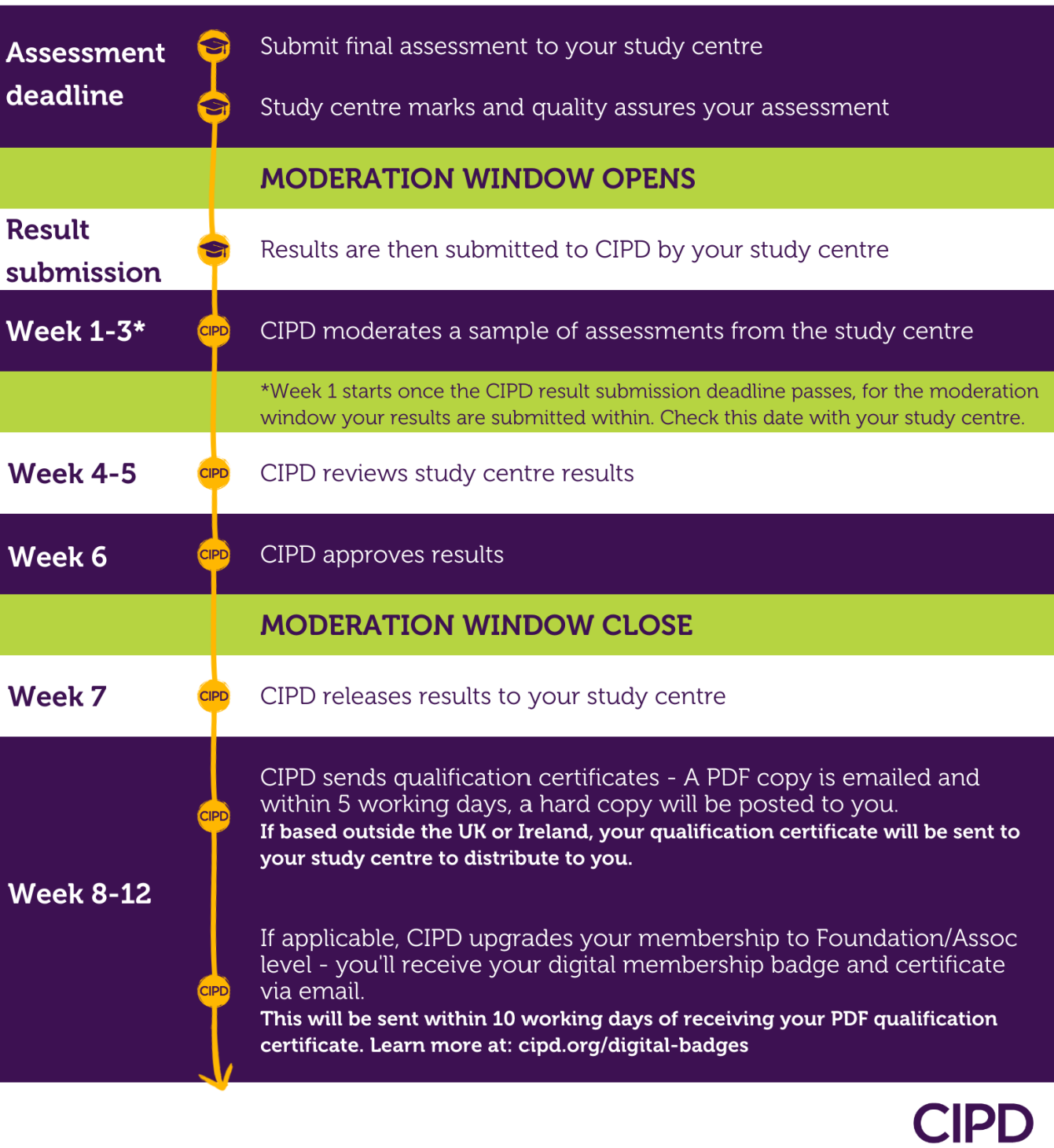
Please note that your CIPD membership must be current for moderation and certification
At The ICS Learn Group, we’re committed to providing every student with a positive, supportive learning experience. However, we understand that sometimes things may not go as expected, and you may feel the need to raise a formal complaint.
If you wish to submit a complaint, please continue by completing the Student Services Webform. When completing the form, provide a clear outline of your concerns and include any relevant details you would like us to review.
Once your complaint is submitted, our team will:
- Record your formal complaint
- Send you a personal acknowledgement email confirming it has been received
- Investigate the concerns raised, keeping you updated every seven working days
- Provide a formal written response once the investigation is complete, including our findings, the outcome, and any next steps
We’re here to support you and ensure your concerns are handled fairly and professionally.
All CIPD students must be registered with CIPD by the ICS Learn Group. This confirms to CIPD that you are officially enrolled on your qualification with us.
CIPD Registration
Your qualification registration with CIPD is completed by our Quality Assurance Team. This registration is completed within three weeks of your enrolment start date.
If CIPD cannot locate your registration after this timeframe, please let us know so we can look into this for you.
CIPD Student Membership
After your registration has been processed, CIPD will contact you directly by email with instructions on how to complete your CIPD Student Membership.
This step is mandatory for your course, and you will receive a CIPD Student Membership Number once completed. This number will be used on the front cover when submitting your assessments.
Important reminders:
- The email from CIPD may appear in your spam/junk folder.
- If you haven’t received the CIPD email within five weeks of your enrolment date, please contact us to check your registration.
- Make sure you use the same email address for your course enrolment and CIPD membership. This ensures your account and registration link correctly for assessment and moderation.
All tutor contact is managed via the ‘contact your tutor’ section.
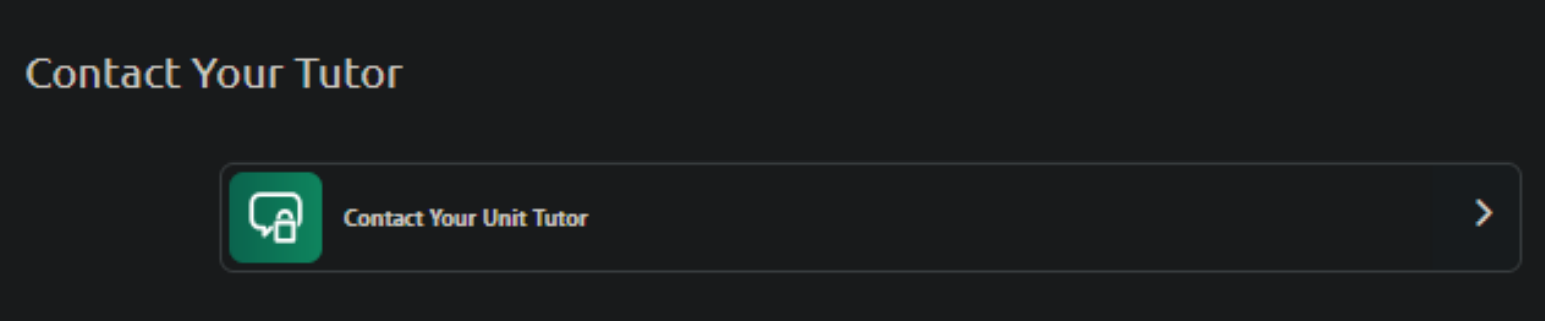
You will find this in your course materials.
If your course has multiple units then there will be a link in each unit.
Click on  the icon/text to access the section.
You can now view existing conversations or create a new one.

Open conversations are automatically presented on the first screen.
Closed conversations can be accessed by clicking the ‘closed’ link.
Start a new conversation by clicking the 'Create' button. You can now begin to leave your message.
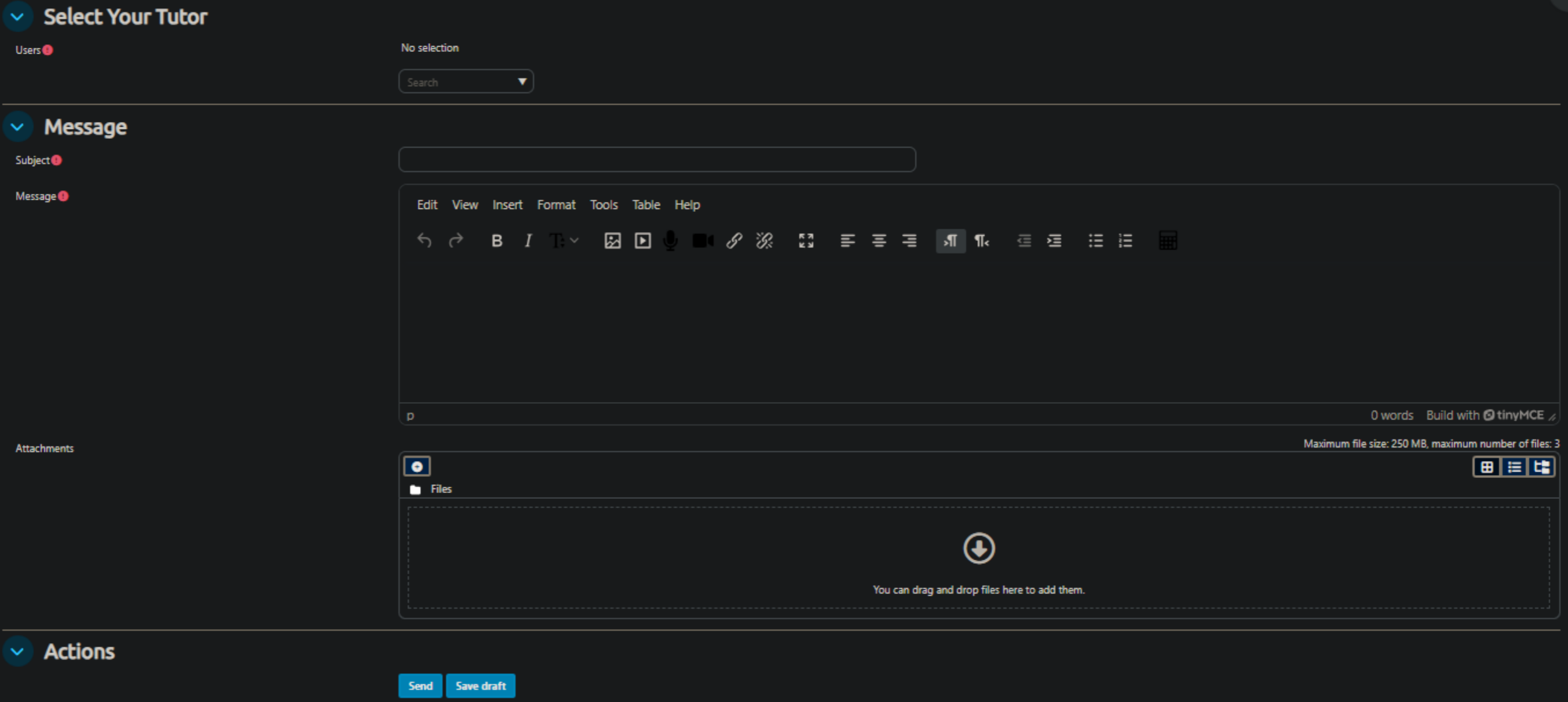
Click on the ▽ in the select your tutor drop-down menu.
Select your tutor name/type.
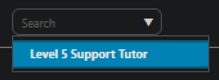
You’ll see the selection confirmed and can now move onto the message.

Add a subject in the ‘subject’ box.
Write/paste your message in the message box.
Please include as much context as possible for the tutor, so they can provide you with the best answer to your question.
If you wish to request a call from your tutor, indicate this in the subject box and in the message box provide an outline of what you wish to discuss along with a contact number/s and 2/3 dates/times that you will be available.
Click 'Send' to post the message to the tutor.
The tutor will respond to your message within two working days and when their response is posted a notification  will appear in your profile and be sent to your registered email address.
